Does the EP320 work with Teams, Zoom, or Webex?
This article applies to the Nearity EP320 noise cancelling headphone for call center. Short Answer: Yes. The EP320 supports Microsoft Teams and other popular UC platforms such as Zoom and Webex. With…
This article applies to the Nearity EP320 noise cancelling headphone for call center.
Short Answer: Yes
The EP320 supports Microsoft Teams and other popular UC platforms such as Zoom and Webex. With three connection options — USB dongle, Bluetooth, or USB cable — it works seamlessly on Windows, Mac, Linux, Android, and iOS devices.
How to Connect
1. Connect the EP320 to your computer via the USB dongle, Bluetooth, or a USB cable.
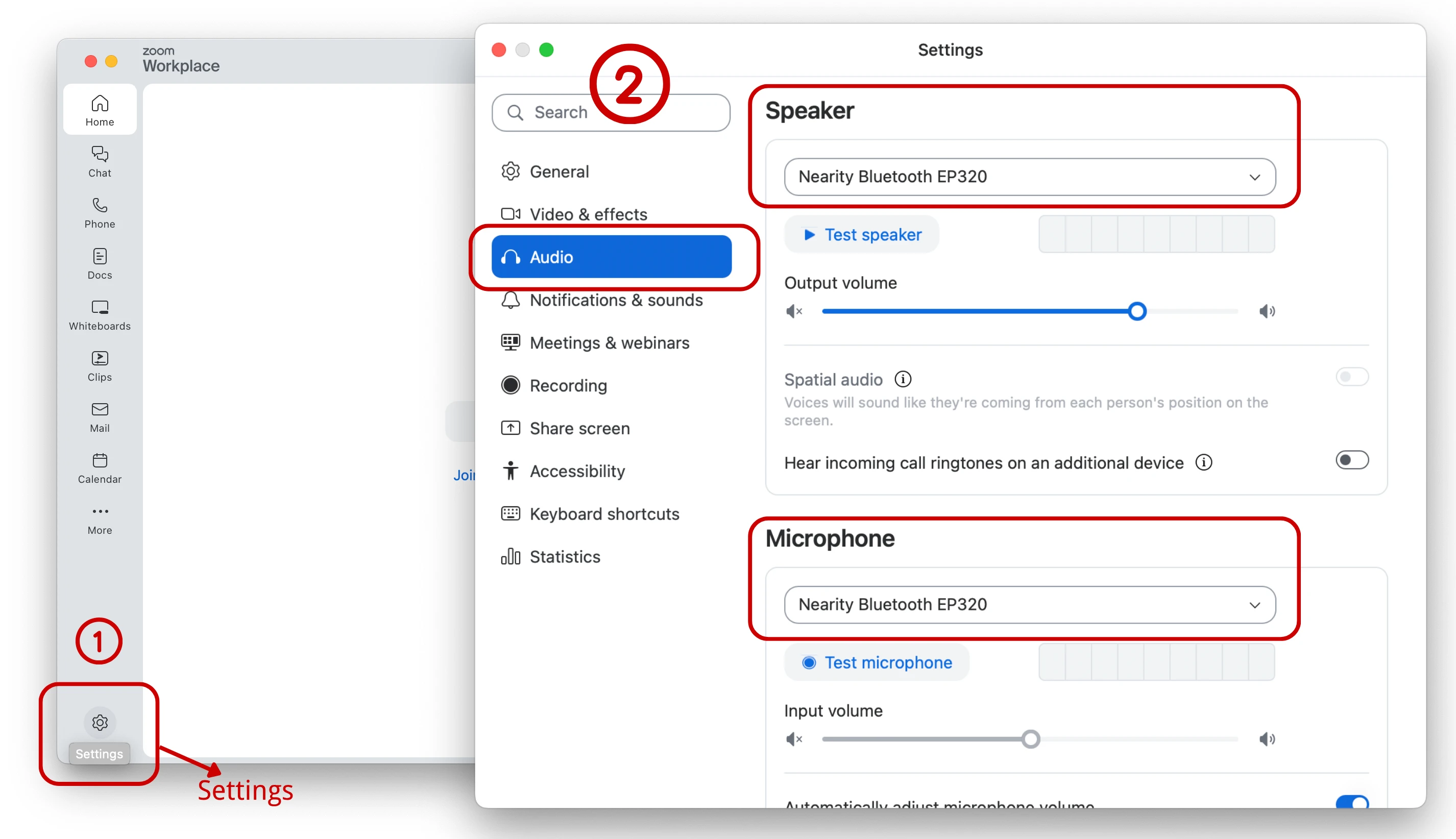
2. In Teams, Zoom, or Webex, open Settings → Audio.
3. Select Nearity EP320 as both the speaker and the microphone.
Take Zoom as an example :
Note on Call Control
The headset’s MFB button answers and ends mobile cellular calls only. For online meetings and calls in Teams, Zoom, or Webex, please answer and end calls with your mouse in the app.
If you have further questions, please contact us: support@nearhub.us
How did we do?
How do I answer or hang up phone calls on my EP320?
Does the EP320 work with both Mac and PC?

