Nearity 360 Alien Starter Kit vs. Ultimate Kit: What's Included and Which Should You Choose?
Compare the Nearity 360 Alien Starter Kit and Ultimate Wireless Pro Kit, including expansion microphones, the NA20 Wireless Dongle, package contents, and tips for choosing the right setup for your conference room.
This guide explains the key differences to help you choose the right configuration without paying for accessories you don't need.
Starter Kit vs. Ultimate Wireless Pro Kit
Feature | Starter Kit | Ultimate Wireless Pro Kit |
360 Alien camera | 1 | 1 |
AM01 expansion microphones | 1 | 2 |
NA20 Wireless Dongle | Not included in the listed kit | Included |
Built-in microphones | 6 | 6 |
Built-in speaker | Included | Included |
Video capabilities | 4K 360° | 4K 360° with USB,1080p with Dongle |
Best for | Users with small to medium standard meeting rooms who want 4K clarity and 360° coverage for everyone in the room. | Users with large meeting rooms who want a cable-free setup and wireless connectivity. |
The main difference: The Starter Kit includes one expansion microphone, while the Ultimate Wireless Pro Kit includes two expansion microphones and an NA20 Wireless Dongle. Both kits use the same 360 Alien camera, so choosing the Ultimate Kit does not mean upgrading to a different camera or getting additional AI video modes.
What's Included in Each Kit?
Nearity 360 Alien Starter Kit
The Starter Kit is a practical option for teams that want to extend the camera's built-in audio pickup with one additional microphone.
Listed kit configuration:
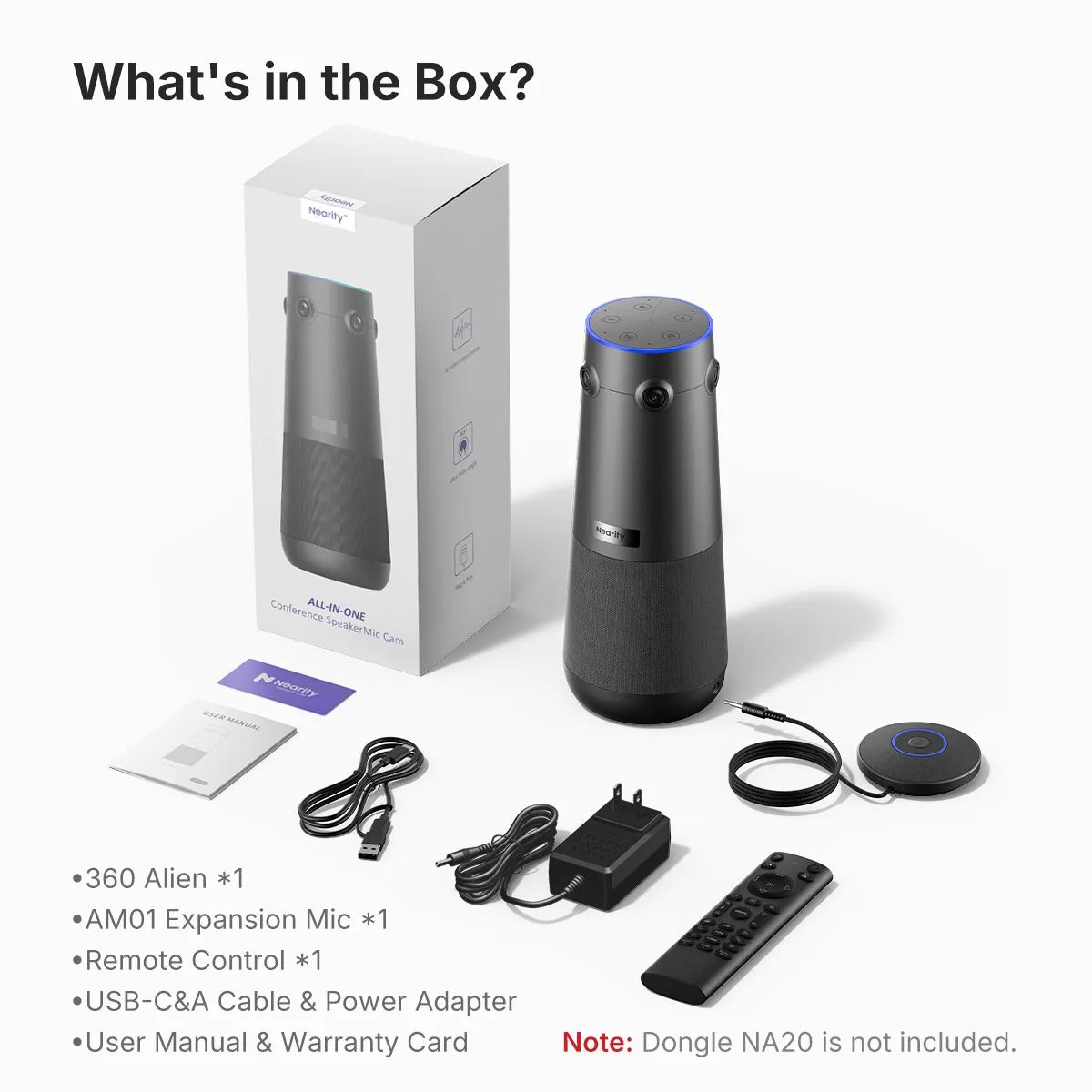
- 1 × Nearity 360 Alien all-in-one conference camera
- 1 × AM01 expansion microphone
The 360 Alien has six built-in omnidirectional microphones with a pickup radius of 5 m / 16 ft. An expansion microphone provides an additional pickup point and greater flexibility when positioning participants around a meeting table.
Choose the Starter Kit if:
- You plan to connect the camera directly to your computer via USB.
- One expansion microphone is sufficient for your room layout.
- You want to keep your initial equipment cost lower.
- You don't currently need the NA20 Wireless Dongle.
Nearity 360 Alien Ultimate Wireless Pro Kit
The Ultimate Wireless Pro Kit is designed for teams that want additional audio expansion and a wireless connection option in one package.
Listed kit configuration:
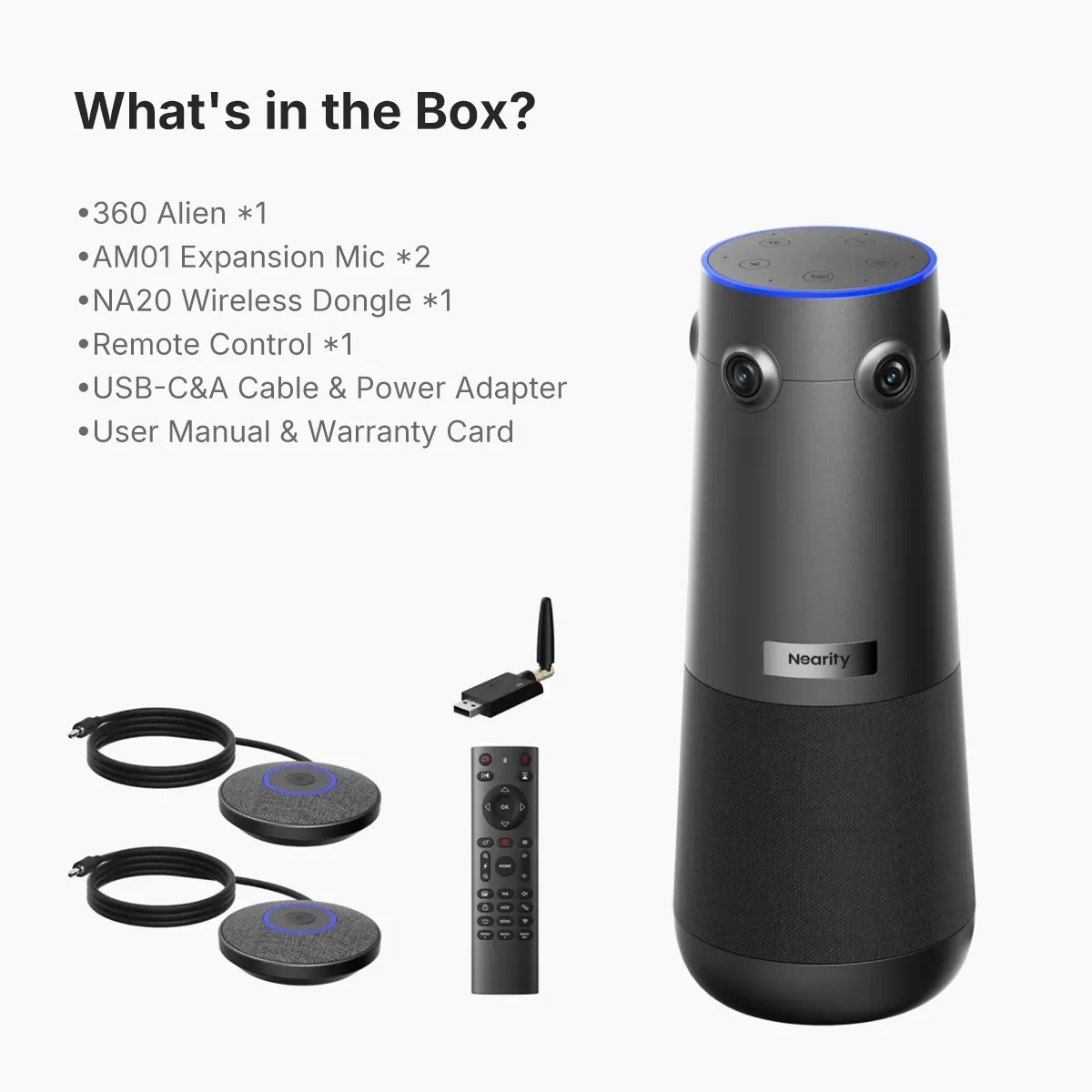
- 1 × Nearity 360 Alien all-in-one conference camera
- 2 × AM01 expansion microphones
- 1 × NA20 Wireless Dongle
The two expansion microphones provide additional flexibility for longer conference tables and larger meeting spaces. The included NA20 Wireless Dongle allows a compatible computer to connect to the camera wirelessly.
Choose the Ultimate Wireless Pro Kit if:
- You need to accommodate larger conference rooms and more meeting participants.
- You want to extend audio pickup coverage with two AM01 expansion microphones, helping participants seated farther from the camera be heard more clearly.
- You want more consistent audio coverage for larger group discussions, hybrid meetings, and rooms with a wider seating arrangement.
- You prefer a more flexible setup with the NA20 Wireless Dongle included, reducing the need for a direct USB connection between the camera and computer.
Actual audio performance depends on room acoustics, microphone placement, seating layout, and background noise.
Do You Need One or Two Expansion Microphones?
The right microphone configuration depends on the room layout, table length, participant positions, and background noise—not just the number of people attending.
- One expansion microphone: A practical starting point when the built-in microphones and one additional pickup point can cover your seating arrangement.
- Two expansion microphones: Better suited to setups that need additional pickup points along a longer table or across a larger meeting space.
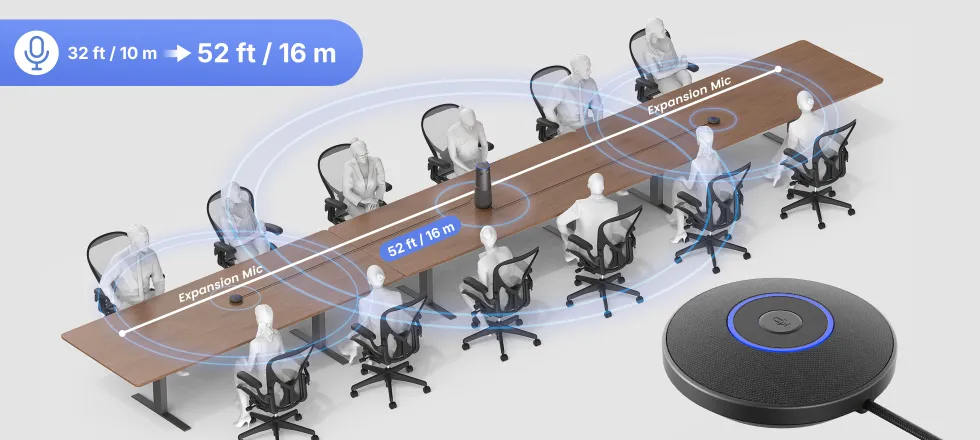
The 360 Alien supports up to two compatible expansion microphones, extending voice pickup coverage to as much as 16 m / 52 ft under suitable conditions.
For reference, the built-in microphones have a pickup radius of 5 m / 16 ft. Actual performance varies with room acoustics, microphone placement, and ambient noise.
For detailed room-size and participant recommendations, see the Nearity 360 Alien Product Guide.
Do You Need the NA20 Wireless Dongle?
The NA20 Wireless Dongle is a separate connection accessory that is included in the listed Ultimate Wireless Pro Kit but not in the listed Starter Kit.
Choose based on how you plan to connect your conference camera:
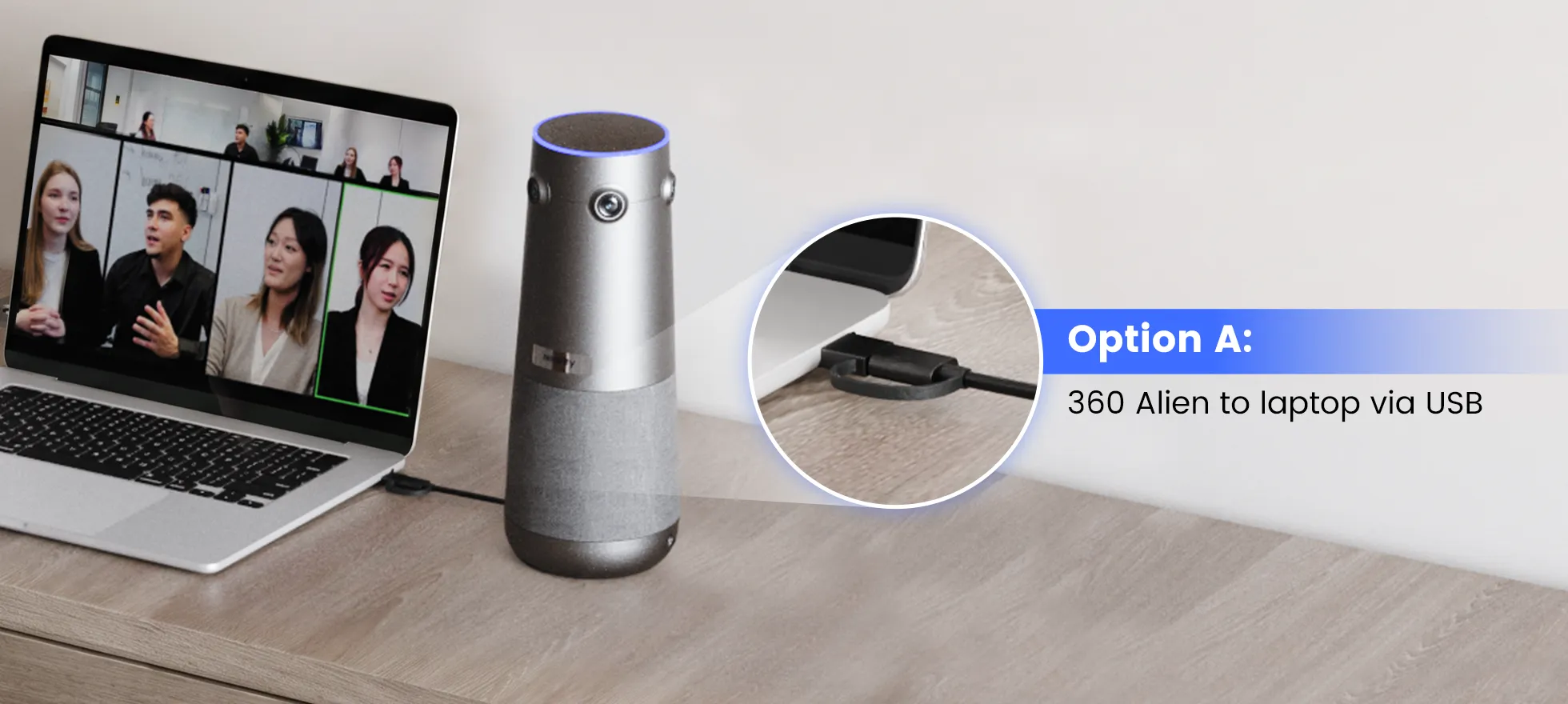
- Direct USB connection: Suitable when the camera can connect to the meeting computer by cable.
- NA20 wireless connection: Useful when you want a wireless connection between the camera and a compatible computer.
- Fixed room installation: Check your required video output, display connection, and installation setup before choosing accessories.
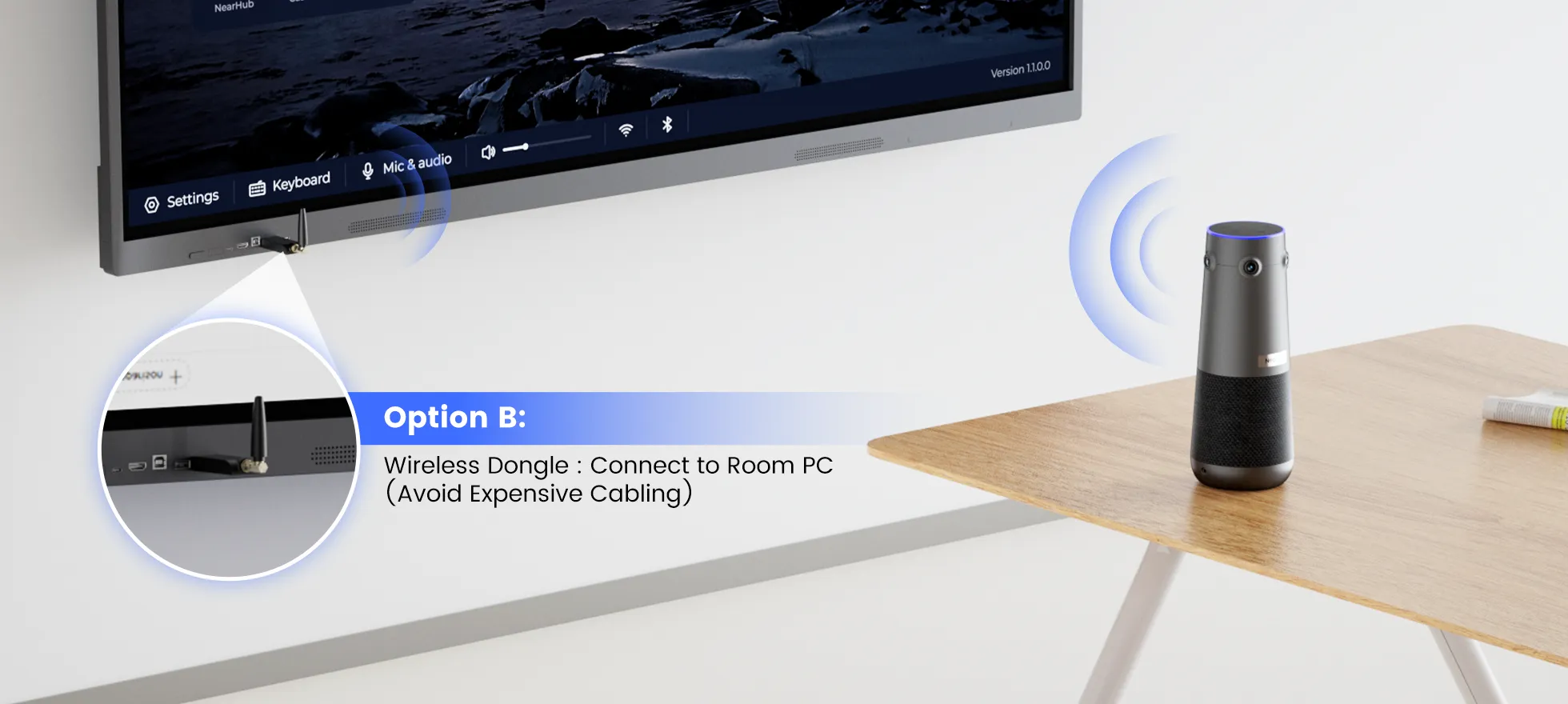
If you already own a compatible NA20 Wireless Dongle, check whether the Starter Kit meets your needs without purchasing another one.
For pairing and setup instructions, see How to Connect the NA20 Wireless Dongle to Nearity Conference Camera.
Can You Add Accessories Later?
If you choose the Starter Kit, you can plan for future expansion by adding compatible accessories as your meeting requirements change.
The 360 Alien supports up to two compatible AM01 expansion microphones. If you initially purchase one expansion microphone, you can consider adding a second when you need additional audio pickup points.
You can also evaluate the NA20 Wireless Dongle separately if you later decide to use a wireless connection.
Before ordering additional accessories, confirm compatibility, availability, and the current product configuration on the NearHub website.
Frequently Asked Questions
Compare the Nearity 360 Alien Starter Kit and Ultimate Wireless Pro Kit to find the right setup for your conference room, audio coverage, and connection needs.
Does the Starter Kit include the NA20 Wireless Dongle?
The listed Starter Kit does not include the NA20 Wireless Dongle, while the listed Ultimate Wireless Pro Kit includes one. Check the current product listing to confirm the package contents before ordering.
Does the Ultimate Wireless Pro Kit provide better video quality?
No. Both kits use the same Nearity 360 Alien camera and provide the same core 4K 360° video capabilities and AI view modes. The main difference is the included accessories: the Ultimate Wireless Pro Kit adds a second AM01 expansion microphone and the NA20 Wireless Dongle.
How many expansion microphones can I use with the 360 Alien?
The Nearity 360 Alien supports up to two compatible AM01 expansion microphones. The Starter Kit includes one, while the listed Ultimate Wireless Pro Kit includes two. Adding expansion microphones provides more flexibility for capturing voices across the meeting table.
Is the Ultimate Wireless Pro Kit better for larger conference rooms?
The Ultimate Wireless Pro Kit is worth considering for larger conference rooms, longer tables, and meetings with more participants. Its two AM01 expansion microphones provide additional audio pickup points, helping participants seated farther from the camera be heard more clearly.
With two compatible expansion microphones, audio pickup coverage can extend up to 16 m / 52 ft under suitable conditions. The camera's built-in microphones have a pickup radius of 5 m / 16 ft. Actual performance depends on room acoustics, microphone placement, seating layout, and background noise.
For room-size recommendations, see the Nearity 360 Alien Product Guide.
Will two expansion microphones make voices clearer?
Two expansion microphones provide additional pickup points and can help capture voices more consistently across a larger meeting space. This is especially useful when participants are seated farther apart or along a long conference table. For the best results, position the microphones near the participants and minimize background noise.
Actual audio clarity depends on the room environment, microphone placement, and speaking distance. Two expansion microphones do not guarantee the same results in every room.
Can I use either kit with Zoom, Microsoft Teams, or Google Meet?
Yes. The Nearity 360 Alien is compatible with Zoom, Microsoft Teams, Google Meet, Webex, and other supported meeting applications. Select the appropriate camera, microphone, and speaker in your meeting software's device settings.
For connection instructions, see Connect Nearity Conference Cameras to Meeting Platforms.
Can I use a wireless connection without sacrificing 4K video?
Video output depends on the connection method. The 360 Alien supports up to 4K video over USB, while the NA20 Wireless Dongle provides 1080p wireless output. If 4K video is essential for your setup, use a supported USB connection.
For wireless dongle instructions, see How to Set Up the NA20 Wireless Dongle.
Is the Ultimate Wireless Pro Kit worth the extra cost?
The Ultimate Wireless Pro Kit may offer better value if you need two expansion microphones for broader audio coverage and the NA20 Wireless Dongle for wireless connectivity. It is a practical option for larger meeting spaces where participants need to be heard clearly across a wider seating area.
If one expansion microphone is sufficient and you plan to connect directly over USB, the Starter Kit may meet your needs. Compare current kit and accessory prices before ordering.
If You Still Need Help
If the steps above do not resolve the issue, please contact NearHub Support at support@nearhub.us.
How did we do?
Nearity A20S Conference Speakerphone — Product Info, Room Fit, Platform Compatibility, and Spec Comparison

