My EP320 is connected but there’s no sound — how do I fix it?
This article applies to the Nearity EP320 headset connected to a Windows PC or Mac. If the headset is connected but you can’t hear any sound, follow the steps below based on your connection method. I…
This article applies to the Nearity EP320 headset connected to a Windows PC or Mac. If the headset is connected but you can’t hear any sound, follow the steps below based on your connection method.
If You’re Using a Bluetooth Connection
1. Go to your computer’s Settings → Bluetooth and confirm that the Bluetooth connection to the EP320 is successful.
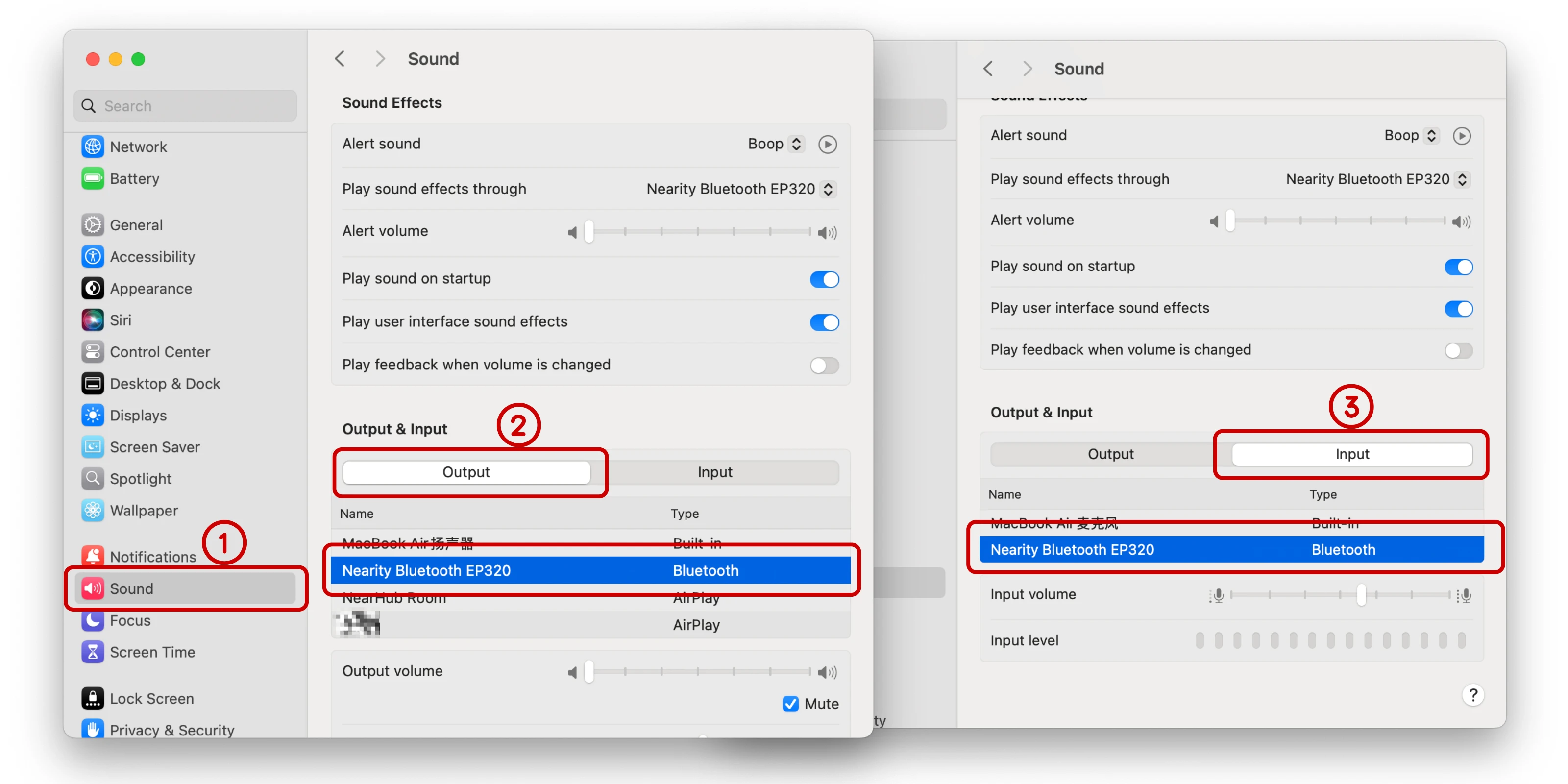
2. Open the Sound settings.
3. Select Nearity EP320 as the default output device and the default input device.
If You’re Using the USB Dongle
1. Open your computer’s Sound settings.
2. Select Nearity EP320 as the default output device and the default input device.
Also Check
• The volume level on both the headset and the computer.
• The audio device selected inside your calling/meeting app (Teams, Zoom, Webex) — apps can override the system default.
If the steps above don’t solve your problem, please contact us: support@nearhub.us
How did we do?
My EP320 suddenly won’t connect — what should I do?

