A20S Microphone Works but Speaker Is Missing on Windows 11
If your Nearity A20S microphone works but the speaker is missing on Windows 11, update the A20S firmware via NearSync to restore full audio functionality.
If your Nearity A20S was working normally before but suddenly appears only as a microphone on Windows 11, while the speaker is missing in Zoom, Microsoft Teams, or Windows Sound settings, this issue may be related to a recent Windows 11 audio update affecting some USB audio devices.
Symptoms
You may notice that:
- The A20S microphone still works normally.
- The A20S no longer appears as a speaker/output device.
- Zoom or Microsoft Teams can select the A20S as the microphone, but not as the speaker.
Solution
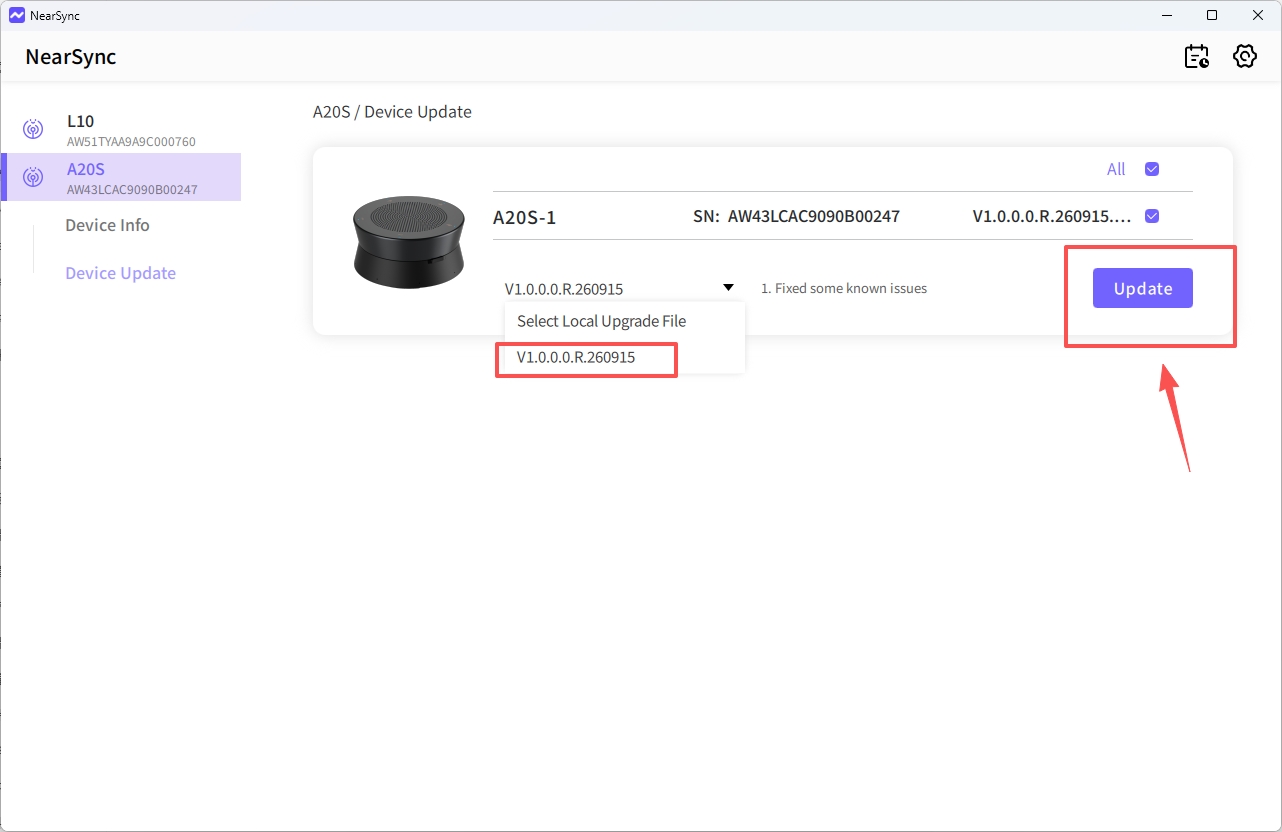
Update the A20S Firmware in NearSync
Please follow these steps:
- Connect the A20S to your Windows computer via USB.
- Open NearSync.
- Select your A20S device.
- Click Update.
- Upgrade the firmware to V1.0.0.0.R.260915.
- After the update is complete, disconnect and reconnect the A20S.
- Restart your meeting application and check the audio settings again.
The A20S should now appear as both:
- Microphone / Input
- Speaker / Output
We also recommend keeping Windows 11 updated to the latest version.
If the speaker is still missing after the firmware update, please contact Nearity Support and provide a screenshot of your NearSync device page and Windows Sound settings.
If You Still Need Help
If the steps above do not resolve the issue, please contact NearHub Support at support@nearhub.us.
How did we do?
A20S Daisy Chain Not Working

