How do I put my EP320 into pairing mode?
This article applies to the Nearity EP320 wireless headset. First-Time Pairing. When you power on the EP320 for the first time, it automatically enters pairing mode. Simply enable Bluetooth on your d…
This article applies to the Nearity EP320 wireless headset.
First-Time Pairing
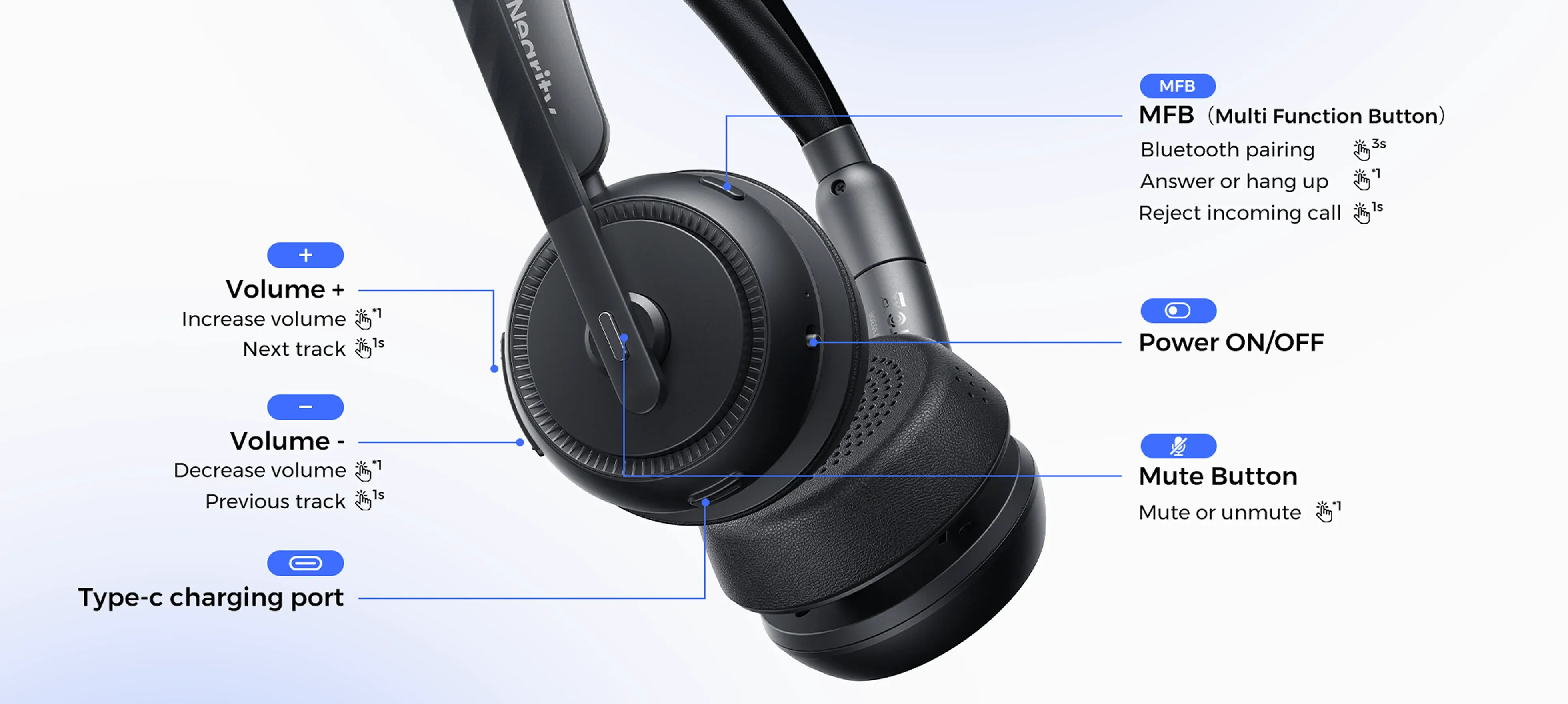
When you power on the EP320 for the first time, it automatically enters pairing mode. Simply enable Bluetooth on your device, search for “Nearity EP320” in the device list, and tap to connect
Re-Entering Pairing Mode
If you want to pair the headset with a new device, press the MFB button and the Volume Up button at the same time. The headset will enter pairing mode, and you can find “Nearity EP320” on your new device.
Still Having Trouble?
If the headset doesn’t appear in your device’s Bluetooth list, see our guide: My EP320 suddenly won’t connect — what should I do?.
If the steps above don’t solve your problem, please contact us: support@nearhub.us
How did we do?
Can I connect my EP320 to two devices at the same time?

